
The name
κόσμος, kosmos: order, the world as an arranged whole.
In ancient Greek, kosmos means order, the opposite of chaos. Kosnote takes a busy, messy day and turns it into clear notes, one for each piece of work. Kosmos + note = Kosnote.
Free · Windows 10 & 11 · No account · No cloud
Free · For Windows 10 & 11
Keep one note for each piece of work, linked to its files and emails. Kosnote reminds you what is still waiting, and everything stays on your own PC.
One note for each piece of work, linked to its files and emails. Everything stays on your PC.
Kosnote 0.1.7 · 108 MB · About Kosnote
On your phone? The demo runs here. Install on your PC later.
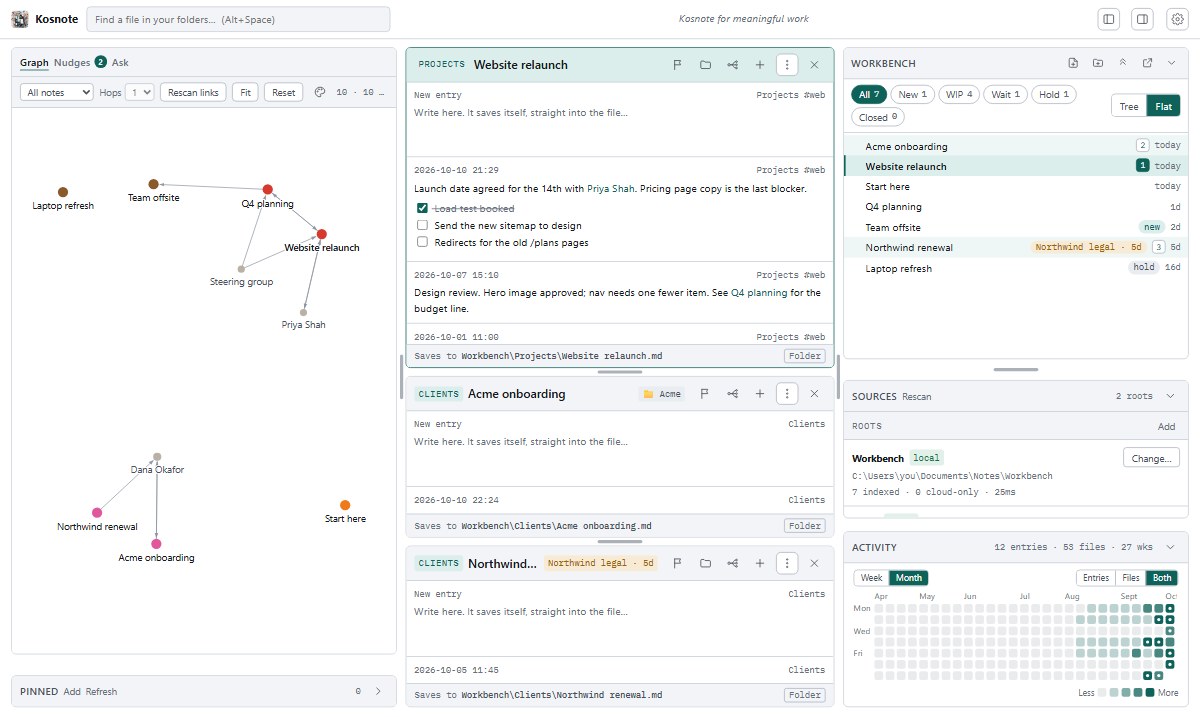
Projects, clients, problems to solve. Sort them your way. Kosnote saves as you type.
Link files, OneDrive folders and Outlook emails to a note. Nothing is moved or copied.
Ask questions about your work. The AI only reads. It changes nothing unless you say so.
Notes are normal text files (Markdown). Any editor can open them, including Obsidian.
No account and no Kosnote cloud. Download it and start.
Press Alt+Space in any program to find a note or a file.
Use an AI service you already have, run one on your PC, or use no AI at all.
What it does
01 · NUDGES
Kosnote notices work that is waiting for someone else, work that has stopped moving, and notes you did not finish. It shows them to you before they are forgotten. You do not need to set up tags or rules.
02 · ALT+SPACE
Press Alt+Space in Excel, Outlook or your browser. Kosnote searches your notes and every folder you add, including OneDrive, and opens the note or file you need.
03 · ASK
Ask for a project summary, a list of open tasks, or a draft update. The AI only reads your notes, and nothing changes until you press Save. Choose a model that runs on your PC, and nothing leaves your computer.
Ask sends text only to the provider you choose here.
04 · GRAPH
Type [[ to link one note to another. The graph shows which projects, clients, files and emails are connected, so you can see what else is affected before you make a change.
Free, for Windows 10 and 11. You do not need admin rights to install it.
Kosnote-Setup-0.1.7.exe · 108 MB
Windows may warn you the first time. Until the installer is signed, SmartScreen shows “Windows protected your PC”. Choose More info, then Run anyway.

The name
κόσμος, kosmos: order, the world as an arranged whole.
In ancient Greek, kosmos means order, the opposite of chaos. Kosnote takes a busy, messy day and turns it into clear notes, one for each piece of work. Kosmos + note = Kosnote.